Alfred workflow to access my selfhosted tools
Published on Feb 13, 2026
Over the past years I've accumulated a bunch of self-hosted software on my server (Miniflux, Plex, Radarr, Sonarr and the usual suspects). Since Tailscale became a thing I don't expose them on subdomains any more like and usually just access them through a bookmarked "Server" folder in Safari. This folder became crowded over time and also required...clicks so today I decided to improve that.
I'm already using Alfred.app as my clipboard manager and partially as an app launcher (Mostly Spotlight though), today I've added a new custom Alfred Workflow that allows me to open my self-hosted tools in the browser through Alfred. I've added a tiny API on my Intranet that returns the list of web interfaces that are available on my server and now by just opening Alfred, typing "s" and then fuzzy searching through all of them I can launch them instantly.
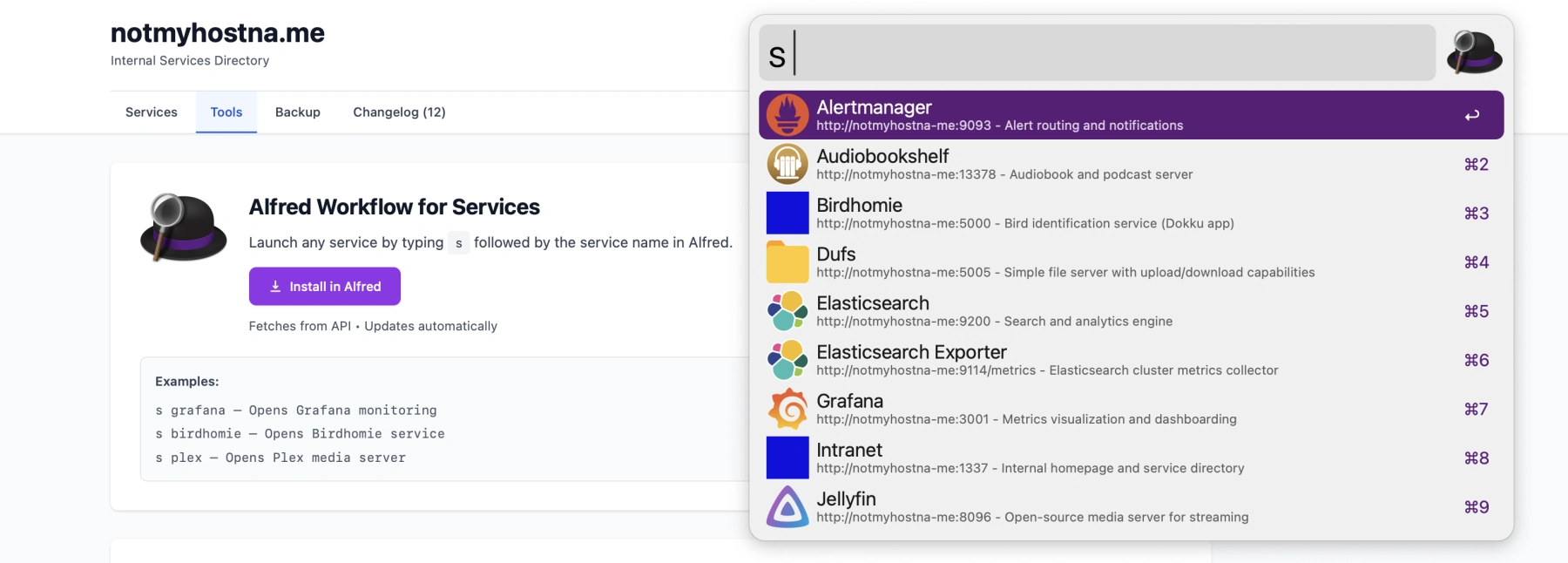
On the server side it's just returning a simple list like the following, so the Alfred workflow is always up to date.
[
  {
    "id": "grafana",
    "title": "Grafana",
    "description": "Metrics visualization and dashboarding",
    "url": "http://notmyhostna-me:3001",
    "category": "monitoring",
    "type": "docker",
    "icon": "https://cdn.jsdelivr.net/gh/homarr-labs/dashboard-icons/png/grafana.png"
  },
  {
    "id": "birdhomie",
    "title": "Birdhomie",
    "description": "Bird identification service (Dokku app)",
    "url": "http://notmyhostna-me:5000",
    "category": "applications",
    "type": "dokku",
    "icon": "http://notmyhostna-me:5000/favicon.ico"
  }
]